Reimagining Claims Support
From a Legacy System to an Intelligent Workflow
Overview
Included Health helps members resolve complex claims issues, from incorrect medical bills to denied services. This project reimagined the end-to-end claims support experience across both member-facing and internal workflows, replacing a fragmented legacy process with a faster, smarter and more scalable system.
My role
I led the end-to-end design, from discovery and workflow strategy through information architecture, service design and final execution. I shaped both the product and design direction, rethinking how information, tasks, people and automation work together across the claims journey.

Context
Included Health helps members resolve complex claims issues, from incorrect medical bills to denied services.
Members submit a case through the app, while the Care Team investigates and resolves it behind the scenes.
But the team was still working in Banyan, a fragmented legacy platform that made cases difficult to navigate, slowed down everyday work, and was increasingly difficult to scale.
The opportunity
-
Bring claims work into one unified platform
-
Make cases easier to understand and navigate
-
Reduce manual effort and operational complexity
-
Improve operational efficiency by 18%
Discovery
Journey map to identify pain points and uncover opportunities

Through workflow mapping, user research, and cross-functional workshops, I found that the friction went beyond individual screens.
The underlying system had three fundamental problems:
1. The structure was difficult to understand
2. Critical information was disconnected from the work
3. Too much of the process depended on manual coordination
This became the foundation for the redesign.
01 - Create a clearer system
The problem
The legacy experience lacked a clear information hierarchy. Important information and actions were scattered across the system, forcing Care Team members to constantly figure out where to look and what to do next.
My approach
I redesigned the information architecture around the core objects and relationships in the Claims workflow.
STEP 1
Define the system
I co-led a workshop to identify the core objects, actions, and terminology across the experience.

STEP 2
Map the relationships
I connected those objects across the end-to-end workflow to understand how information and actions should work together.

STEP 3
Test the structure
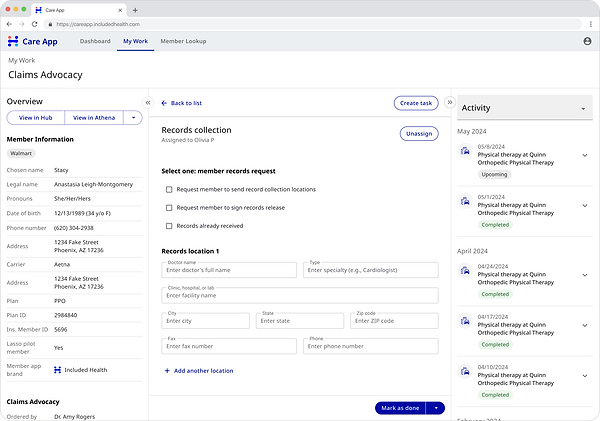
I translated the model into two gray-box concepts, tested them with Care Team members, and used the findings to shape the final IA.

STEP 4
Develop the final IA
Based on what we learned, I developed a final IA direction.


The redesigned experience
A simpler, more predictable structure that makes it clear where information lives, where work happens, and what requires attention.
02 - Bring information into the work
The problem
Care Team members spent significant time searching for missing information and piecing together context across multiple tools.
The problem wasn't simply access to information.
The right information wasn't available at the moment it was needed.
My approach
I designed the workflow and its information requirements together.
STEP 1
Map the right information to each decision point
I mapped the critical information needed at each stage of a case, where it should come from, when it was needed, and what decision it supported.

STEP 2
Bring the right information into the workflow
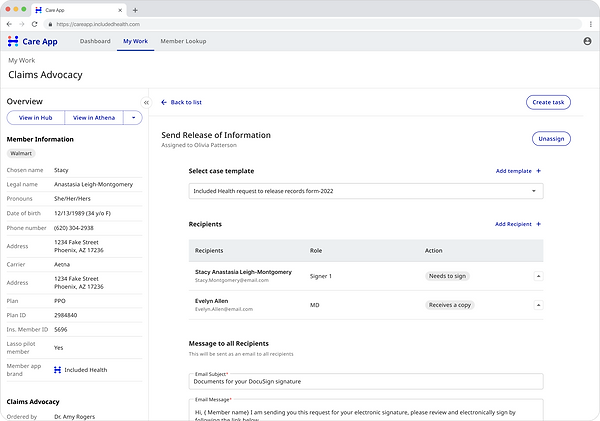
Then I embedded that information directly into the relevant task and workflow.

The redesigned experience
A focused workspace that adapts to the work at hand - surfacing the most relevant context, actions and tools in one place.
Instead of searching for information, the Care Team can focus on making decisions and moving the case forward.


03 - Orchestrate the workflow
The problem
Many steps in the Claims process were manual and inconsistently executed.
Care Team members had to manage the process itself while also trying to solve the member's problem.
My approach
I focused on where the system could take on more of the work without removing the human judgment that matters.
STEP 1
Identify where automation creates the most value
I led workshops with users and cross-functional partners to map the existing workflow and identify repetitive steps, inconsistencies, and opportunities for automation.

STEP 2
Design workflows that balance human judgment with automation and AI
I designed end-to-end workflows that combined human judgment with automated system actions.
I also identified where AI could provide additional support, including:
-
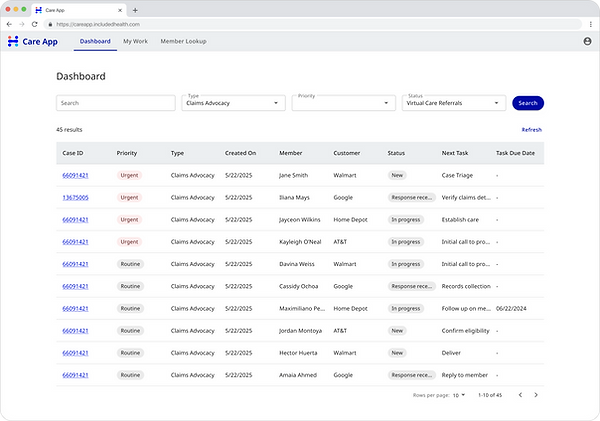
Prioritizing work
-
Recommending next steps
-
Drafting member communications

STEP 3
Connect the workflow across the broader service
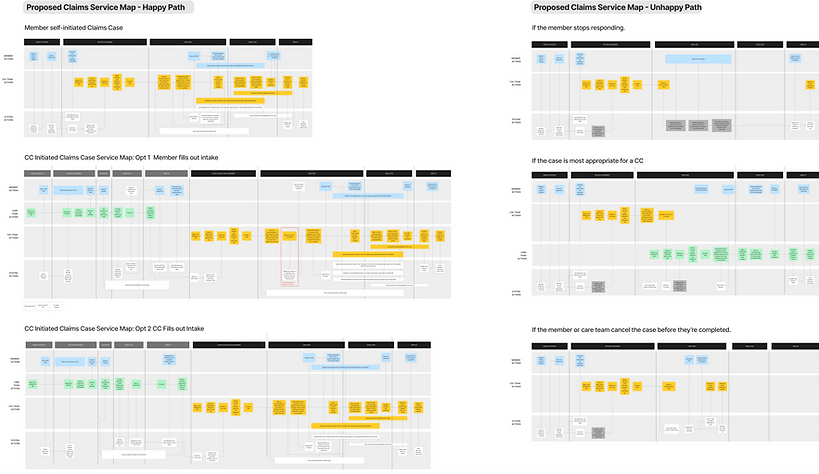
I mapped both happy and unhappy paths across key scenarios to understand the service as a whole—how members, multiple Care Teams, internal systems, and operational processes connect to move a claim toward resolution.
The redesigned experience
A workflow uses automation and AI to reduce repetitive effort, improve consistency and help orchestrate the tasks and services required to resolve a case.


From screens to a system
Together, these changes transformed Claims from a collection of screens into a more coherent operating system for case resolution.
-
A clearer structure helps the team understand the case.
-
Contextual information helps them make better decisions.
-
Automation helps move the work forward.
The result is an experience designed not just to migrate Claims to a new platform, but to make the entire service more efficient and scalable.
Impact
16%
reduction in case resolution time
23%
increase in task efficiency
21%
increase in care team satisfaction